Your Spreadsheet Is Not a Commercial Construction CRM

Simply put: a spreadsheet stores contacts. A commercial construction CRM answers the two questions a spreadsheet can't: Which leads are cold, warm, or hot? And what should we do next? Without those answers, your business development team ranks relationships from memory. That is how commercial contractors lose work before the RFP is ever issued.
The Monday Morning Test
You have a pursuit meeting at 10:00 AM, and your company president will ask the same thing as every week: Where do we stand?
So you open the spreadsheet. Six hundred rows of owners, architects, developers, and facility managers. A notes column three people have typed into since 2019. Everything your company knows about its market is in there somewhere.
What it won't tell you is which of those six hundred people to call today. So, you do what most people do. In the absence of real data, you interpret where you stand and the company moves forward on this assumption.
What Can't Your Spreadsheet Tell You?
Your spreadsheet can't tell you who is hot, warm, or cold, or what to do next. It stores what somebody typed. It doesn't know the developer you met at the AGC dinner opened your last three emails, or that a past client hasn't heard from your company in seven months.
Without manual digging, a spreadsheet also can't answer:
Who hasn't had a real conversation with this owner, architect, or engineer in the past quarter?
Which contacts are tied to an active pursuit, and what did we promise them?
Who owns the follow-up after last week's site walk?
Which contacts should skip the next email blast because BD is handling a sensitive pursuit?
When the spreadsheet can't answer, you do. You become the scoring model and the reminder system, until you take a vacation or another job.
Watch the video: Why Excel Is Not a CRM for Commercial Contractors »
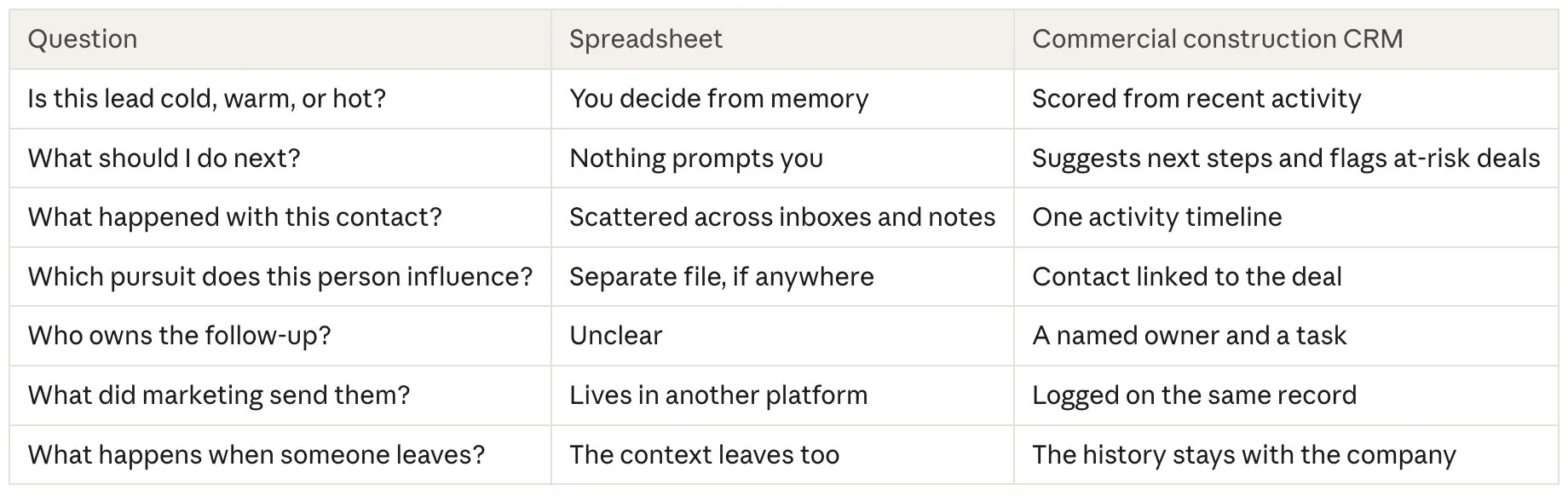
Spreadsheet vs. Commercial Construction CRM
A spreadsheet is a list. A commercial construction CRM is a shared record of every relationship and the pursuits it connects to.
How Does This Cost Contractors Work?
In this industry, the relationship starts long before the RFP—sometimes 18 to 24 months. Owners build short lists from companies they already know and trust. By the time a project goes public, contractors with warm relationships have been in the conversation for months.
One project can involve an owner, a developer, an owner's rep, an architect, an engineer, a broker, and your own precon team. Let one of those relationships cool and nobody sends a notice. You just don't get the call.
The spreadsheet hides a second cost. The real pipeline lives in one or two people's heads (or phones). When a senior business developer or principal leaves, the spreadsheet stays and the context walks out the door.
Why Won't Another Tool Fix It?
Another tool spreads the same relationship across more places. The usual fix is a generic CRM for contacts, an email platform for the newsletter, a scheduler for social posts, and a second spreadsheet for the pipeline.
None of them talk to each other. The CRM doesn't know marketing emailed that owner Tuesday. Marketing doesn't know BD moved the project to shortlisted. You still can't tell hot from cold, because the activity that sets a lead's temperature is split across systems.
What fixes it is one system where contacts, pursuits, and marketing activity live together.
What Should a Commercial Construction CRM Do?
A commercial construction CRM should do six things a spreadsheet can't:
Score every lead. Cold, warm, or hot, based on recent activity, not a guess.
Suggest the next step. Flag the deal at risk and show where to spend your time this week.
Keep one timeline per contact. Emails, meetings, and site walks in order, so anyone can pick up the relationship.
Link relationships to pursuits. Keep the history with a person even before a project exists, then connect it when one does.
Name an owner for every next move. Marketing may prep the project profile, but one person makes sure the follow-up happens.
Put marketing and BD on one record. The email marketing sends shows up where the business developer is looking.
How Does Petra Bring it All Under One System?
Petra is a growth operating system built just for commercial contractors. It replaces the disconnected CRM, scattered marketing tools, and pipeline spreadsheet with one platform.
Activity scores. Every contact is scored cold, warm, or hot and linked to the deals in your pipeline.
Activity timeline. Emails sent through Petra are logged automatically, with every touch in order.
BD template hub. Ready-to-send emails are one click from the contact record.
AI-powered next steps. Petra's AI assistant flags at-risk deals, suggests next steps, and sends weekly insights.
Everything else in the same place. Pipeline tracker with weighted forecasts, a Go/No-Go calculator, email and social marketing, a networking and event tool, a project portfolio, and reporting that ties marketing to pipeline value.
Run this test
Open your spreadsheet and pick any row. Can you tell whether that lead is cold, warm, or hot? Do you know what to do next? If not, take three points to your president:
A forecast built on scores and stages instead of gut feeling.
A pipeline the company owns. Relationships stay when people move on.
Fewer subscriptions. One system instead of five that don't talk to each other.
Then start a 7-day free trial of Petra and see how much time and effort having a real system can save.